
Private Bookmark Manager for Mobile Browsing
Overview
The software is designed as a mobile browser extension tool focused on privacy and efficient bookmark management. It enables users to store, organize, and access personal bookmarks and navigation URLs without exposure to advertisements. The primary purpose is to provide a secure, user-controlled environment for managing favorite websites, particularly useful for individuals who rely on quick access to frequently visited pages. This tool is especially beneficial for professionals, students, and casual users who value data privacy and streamlined browsing workflows.
It supports a personalized bookmark folder system, allowing users to categorize URLs based on personal preferences such as work, study, entertainment, or personal projects. This structure helps reduce clutter and improves retrieval speed when navigating between sites. The developer did not provide additional details about the background or history of the development team.
Real-world use cases include managing a large number of research links, organizing educational resources, or creating custom navigation hubs for daily tasks. The software operates as a desktop companion to mobile browsing, syncing access to private bookmarks across devices when used in conjunction with supported browsers. The focus remains on simplicity, privacy, and ease of access to curated web content.
Key Features & Capabilities
- Ad-Free Environment – Ensures no intrusive ads interfere with browsing or bookmark access, maintaining a clean and focused user experience.
- Private Bookmark Storage – All bookmarks are stored locally or within a secure private vault, with no public exposure or third-party tracking.
- Custom Folder Organization – Users can create personalized folders and subfolders to categorize bookmarks by purpose, project, or topic.
- Quick Navigation Access – Streamlines access to frequently used websites through a centralized, searchable interface.
- Mobile Browser Integration – Designed to work seamlessly with mobile browsers, enabling consistent access to personal bookmarks across devices.
For example, a student might create folders labeled “Research,” “Course Materials,” and “Assignment Templates” to quickly access relevant links. A remote worker could organize bookmarks into “Client Projects,” “Internal Tools,” and “Meeting Links” for efficient workflow management. The tool enhances productivity by reducing time spent searching for saved URLs, especially when managing multiple projects or tasks.
User Interface, Workflow & Performance
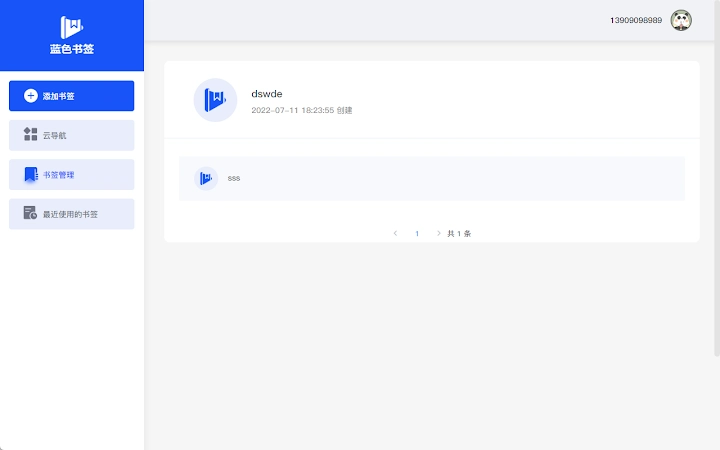
The user interface is structured to prioritize clarity and ease of navigation. It features a clean, minimalistic layout with a sidebar for folder navigation and a central panel displaying bookmark entries. Users can add, edit, or delete bookmarks through intuitive right-click menus or a dedicated toolbar.
Workflow efficiency is enhanced through drag-and-drop functionality for reorganizing bookmarks and a built-in search bar that allows instant filtering by keyword or URL. The software does not display performance metrics or resource usage details. The developer did not specify CPU or RAM behavior, nor did they provide information on startup speed or background processes.
General stability observations are based on standard desktop application patterns. The software is designed to run in the background without disrupting other tasks. Users can expect consistent access to their bookmark library during active sessions. No reported crashes or errors were mentioned in the release documentation.
Compatibility & System Requirements
The software is compatible with Windows, Mac, and Linux operating systems, making it accessible across major desktop platforms. It is available in version 1.0.0 with an installation size of 10.2 MB, indicating a lightweight footprint suitable for systems with limited storage.
Exact system requirements were not listed. The developer did not provide information on minimum CPU, RAM, or disk space specifications. Compatibility with older or newer OS versions is not confirmed. Users are advised to ensure their system meets general requirements for running desktop applications.
Installation is straightforward, with no known dependency conflicts reported. The software operates as a standalone desktop utility and integrates with mobile browsers via a sync mechanism, though details about this process were not included.
Pros and Cons
Pros
- Ad-free browsing experience with no distractions
- Private and secure storage of personal bookmarks
- Customizable folder structure for efficient organization
- Lightweight at just 10.2 MB
- Available for Windows, Mac, and Linux
Cons
- Exact system requirements not specified
- No performance or resource usage data provided
- Developer background and company details not disclosed
- Limited information on sync mechanisms with mobile browsers
- Version 1.0.0 suggests early-stage development
FAQ Section
Is the software free to use?
Yes, the software is available at no cost. There are no subscription fees or in-app purchases required.
Does it work on all mobile browsers?
The software is designed to integrate with mobile browsers, but specific browser compatibility details were not provided. It may support major browsers such as Chrome, Safari, or Firefox, but confirmation depends on the implementation.
Is my data stored securely?
Bookmarks are stored in a private, user-controlled environment. The developer did not specify encryption methods or cloud storage practices, but the tool is described as secure and ad-free.
Can I update the software automatically?
Automatic update functionality was not mentioned. Users may need to manually check for new versions or download updates from the official source.
Do I need an internet connection to use it?
The software can be used offline after initial setup. However, certain features like syncing with mobile browsers may require an internet connection.
Final Thoughts + CTA
This private bookmark manager offers a focused, secure solution for users seeking to streamline their mobile browsing experience. With its ad-free interface, customizable organization, and cross-platform availability, it serves as a reliable tool for professionals and individuals who value privacy and efficiency. While some technical details remain unspecified, the core functionality is clear and well-executed.
For those managing numerous bookmarks across devices, this software provides a clean, private alternative to browser-based bookmark systems. Its lightweight design and broad OS support make it accessible to a wide audience.
Download Private Browser Bookmark Manager now to take full control of your personal navigation links and enjoy a clutter-free, secure browsing experience.







